

Best Ergonomic Accessories
Your Ultimate Guide to Ergonomic Accessories
Other than ergonomic chairs, converters, and desk bikes, there are plenty of ways you can improve the ergonomics of your workstation. A lot of the things that you repetitively do daily as office workers may seem normal to you, but they could be straining your body and putting you at risk of developing Repetitive Strain Injury (RSI).
For example, typing on a non-ergonomic keyboard may be causing your wrists to be misaligned. Although you might be used to it and it doesn’t hurt or bother you, little do you know that there is swelling occurring causing carpal tunnel syndrome.
We rarely ever notice the negative effects of poor working postures until it’s too late. So it’s smart to invest in great ergonomic items to reduce stress, pressure, and tension in several parts of our bodies. No ergonomic addition is ever too insignificant or too small when it comes to taking care of your health.
We collect the myriad of products we pick as the best ergonomic office accessories, along with benefits, tips for your purchase, and other valuable information, to help you find the best products for you.
- 9 products compared on the same points
Our top picks
Editor’s choice
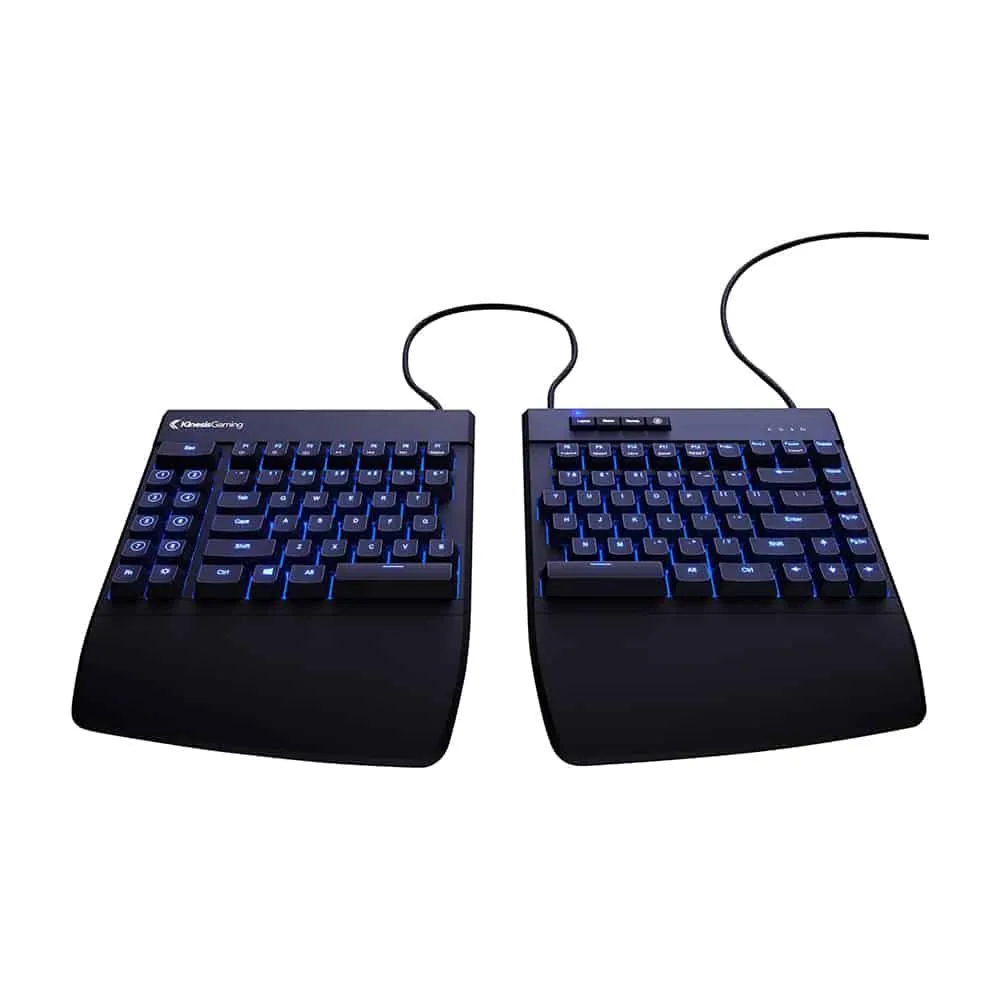
Best Ergonomic Keyboard
Kinesis Freestyle Split Edge Mechanical Keyboard
This split-type keyboard allows you to position your hands better, reducing pain as you work. It comes with a wrist rest too.
Newer model on Amazon: Kinesis Freestyle Edge RGB Plus $199.00
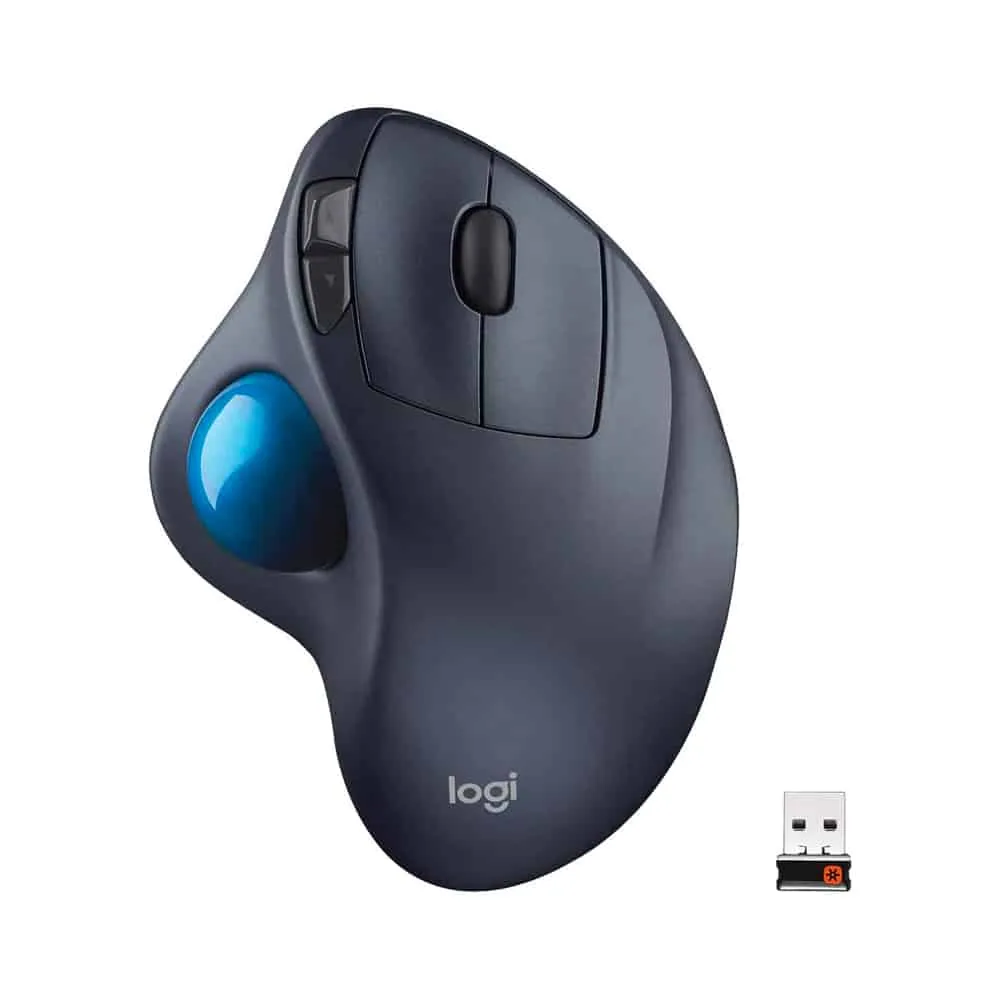
Best Ergonomic Mouse
Logitech M570 Wireless Trackball Mouse
The Logitech M570 has an integrated scroll wheel and easy-to-reach buttons. It comes with a wireless receiver, making it convenient to use.
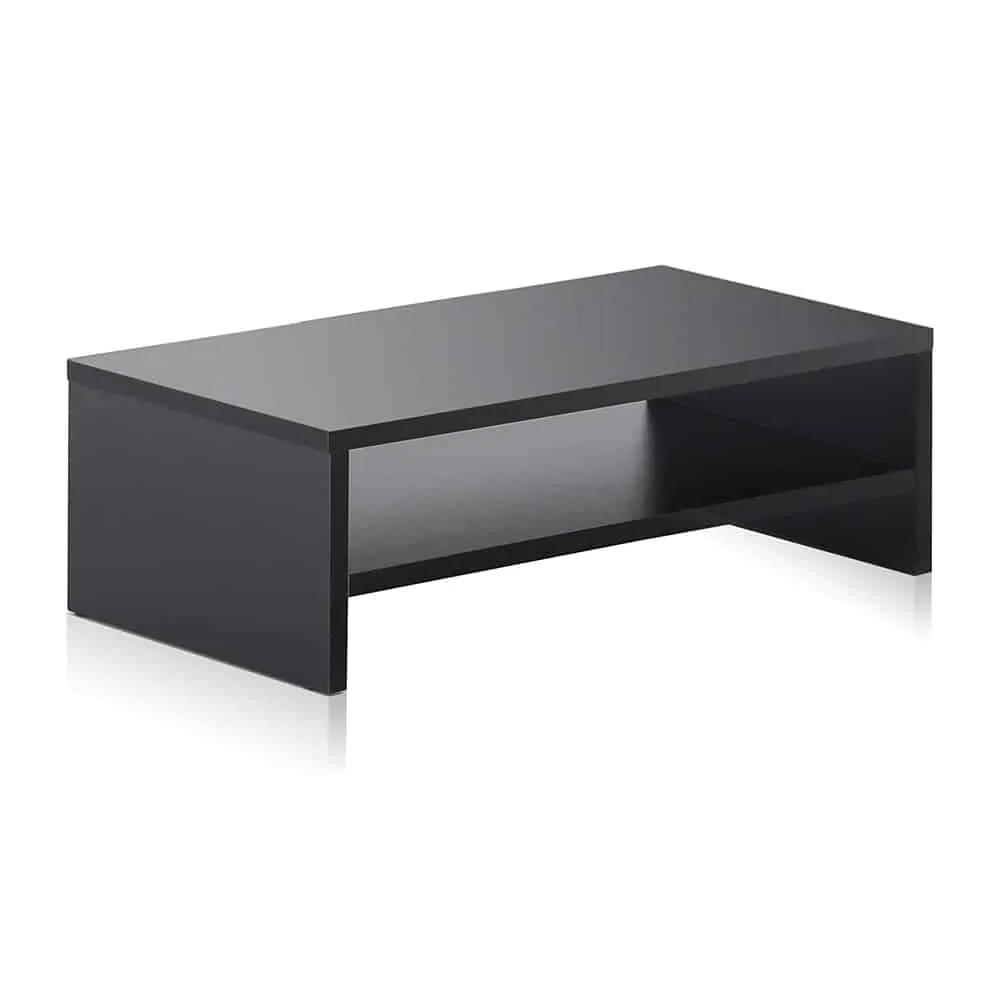
Best Computer Screen Stand
FITUEYES Stand
Constructed with high-quality wood material, the FITUEYES stand is durable enough to carry heavy monitors.
Compared at a glance
| Photo | Model | Best for | What stands out | Buy |
|---|---|---|---|---|
| Kinesis Freestyle Split Edge Mechanical Keyboard | Best Ergonomic Keyboard | Places hands at a natural angle |
Check price
Newer model on Amazon: Kinesis Freestyle Edge RGB Plus $199.00 |
|
| Logitech M570 Wireless Trackball Mouse | Best Ergonomic Mouse | Features a thumb rest with a gesture button |
$158.00 Check price |
|
| FITUEYES Stand | Best Computer Screen Stand | Helps reduce neck pain |
$25.99 Check price |
|
| Fellowes Memory Foam Wrist Rest | — | Helps reduce pain |
$17.90
List price |
|
| 3M Keyboard Tray | — | Fully adjustable with 360 degrees swivel |
$211.39 Check price |
|
| PWR+ Adjustable Tablet Mount | — | Non-slip bottom for added stability |
$32.99 Check price |
|
| MicroDesk Document Holder | — | Helps maximize surface space |
$93.81
Was |
|
| Kensington Adjustable Desk Comfort Keyboard Under-Desk Drawer | — | Adjustable SmartFit system ensures aid |
$44.08
Was |
|
| Humanscale FM 300 Foot Machine Foot Rocker | — | Encourages movement to reduce fatigue and enhance circulation |
$129.99 Check price |
Every pick reviewed
#1 Best Ergonomic Keyboard
Kinesis Freestyle Split Edge Mechanical Keyboard
By now, you may be used to conventional keyboards. So the fact that the Kinesis Freestyle Edge Split Mechanical Keyboard is split into two may shock you.
But actually, this design makes it great for ergonomics, as separating it into two helps you avoid hurting your wrists and fingers while typing.
With this, you have more liberty to arrange the placement of the two different sets of keys according to what suits you best. You can also move your mouse closer to you so you don’t have to strain your arm reaching out for it.
Overall, this maximizes your overall comfort and control while typing. But it’s not only the shape and design that makes the Kinesis Freestyle Edge worth your investment.
It also has cushioned palm supports to keep your palm and wrist comfortable while you work, mechanical switches for easy clicking and typing, plus fully programmable engines so you can customize it to make reaching for your keys much easier and more familiar.
Read our full Kinesis Freestyle Split Edge Mechanical Keyboard review
What we like
- Places hands at a natural angle
- Braided cables for organization
- 1ms response time, which means no delays while typing
What we don’t
- A bit pricey as you have to buy other items separately
- RGB color may not be comfortable for the eyes
Check price on Amazon Opens in a new tab · we may earn a commission
Newer model on Amazon: Kinesis Freestyle Edge RGB Plus $199.00
#2 Best Ergonomic Mouse
Logitech M570 Wireless Trackball Mouse
You might be wondering how using a mouse can cause repetitive stress injuries and why you need an ergonomic mouse.
Simply put, the position of your hand while holding your mouse isn’t ideal, there being no brace. You might not feel anything right now, but prolonged bad posture like this can cause significant injuries in the long run, especially while doing repetitive motions like clicking and moving your mouse around.
With the Logitech M570 Wireless Trackball Mouse, you can be more assured of a reduced risk of RSIs. You don’t need to move your mouse to hover your cursor, as you can simply navigate the trackball with your thumb.
The mouse stays in place the whole time. This reduces pressure while working, especially if you do a lot of computer work.
The gentle curve of the mouse offers optimal support for your hand, adjusting it in a natural position. The buttons are also easy for you to reach, strategically placed close to your forefingers.
What we like
- Features a thumb rest with a gesture button
- Wireless design
- 18 months battery life
What we don’t
- Not as durable
- Switches will eventually fail
$158.00
Check price on Amazon Opens in a new tab · we may earn a commission
#3 Best Computer Screen Stand
FITUEYES Stand
The FITUEYES Computer Stand makes for an aesthetic addition to your workstation.
It functions as both a platform and a desk accessory that saves you space and improves organization on your work surface.
This accessory helps place your screen at eye level, reducing the risk of neck pain, eye strain, headache, and more. Pairing this item with a supportive home office chair can make your space a comfortable work environment.
This riser is made with a solid construction that can carry even heavy monitors and other equipment like printers and fax machines that weigh up to 50 pounds.
Underneath the platform is additional storage where you can place documents, a laptop, or other work essentials. This is indeed a gorgeous piece of ergonomic equipment that will breathe elegance into your workstation.
It comes in three wood colors: black, brown, and oak. If you don’t have a computer and just work on a laptop, a good alternative to this is the Sierra Wooden Laptop Stand.
What we like
- Helps reduce neck pain
- Made of MDF wood
- Workspace saver
What we don’t
- Not height adjustable
- Shelf space may be limited
$25.99
Check price on Amazon Opens in a new tab · we may earn a commission
#4
Fellowes Memory Foam Wrist Rest
A rest is an important accessory to have, especially if you’re pounding on your keyboard today.
With the Fellowes Memory Foam Wrist Rest, you have a comfortable and ergonomic cushion for your arms and wrist, compared to the hard-edged surface of your table.
The Fellowes Memory Foam is made with the highest quality of pure memory foam that responds to the weight and warmth of your body.
It props up your arms and wrists, providing a soft surface as you type. This is while redistributing the pressure points to prevent hindering blood circulation.
What we like
- Helps reduce pain
- Lightweight
- Durable jersey fabric covering
- Non-skid backing
What we don’t
- May be narrow for some
$17.90
List price $20.99
Save 15%
Check price on Amazon Opens in a new tab · we may earn a commission
#5
3M Keyboard Tray
The 3M Keyboard Tray is made with your preferences and needs in mind. It’s fully adjustable, so you can set the height and angle to your desired measurements.
The solid wood platform can be adjustable from 4.5 inches to 6 inches, and the tilt can be angled from 10 to 15 degrees. That way, you can set your comfortable work environment.
This tray is as sturdy as trays can get, thanks to its sturdy wood platform that helps keep bouncing and shaking at bay while you pound away. The wood is covered in leatherette and equipped with a gel cushion for optimal propping.
When not in use, you can tuck the tray under your desk and pull it back up when you need it again, which eliminates the need to detach and reattach the accessory every time.
What we like
- Fully adjustable with 360 degrees swivel
- Battery-saving mouse surface
- Leather-covered gel pad
- Adjustable tilt and height
What we don’t
- Adequate under-desk space is needed to tuck it under the desk when not in use
- A little pricey
$211.39
Check price on Amazon Opens in a new tab · we may earn a commission
#6
PWR+ Adjustable Tablet Mount
Chances are, you work on your tablet while seated on your work table, in a coffee shop, or on other surfaces around your home office or workplace. Or maybe you play games, browse your social media news feeds, etc. during your breaks.
While doing so, you’re hunching over and leaning in to get a better view of your screen. This puts pressure on your neck and lower back, not to mention that it also disrupts the proper curve of your spine.
To transition to better and ergonomic tablet use, you need a tablet mount. The PWR+ Adjustable Table Stand is our top pick, considering that it’s a host to a bunch of great features you will benefit from.
Adjustability is a breeze with this one, able to swivel and turn at any angle. If you want your tablet in landscape view instead of portrait, you can turn the rotation clip 360 degrees until you get your desired orientation.
If you want to move your tablet to get a better view of your screen, move the arm 360 degrees. You can also raise and lower it to 150 degrees.
Putting your tablet in the mount is as easy as opening the claws and sliding the device in. The claws are made to firmly and securely grasp your tablet and are equipped with silicone covering to prevent scratches and dents on your device.
The holder also has access holes so you can easily charge your tablet while it’s mounted.
What we like
- Non-slip bottom for added stability
- Universal fit (suitable for smartphones and tablets 4 inches to 11 inches in length)
- Superior adjustability
What we don’t
- It’s a heavy tablet stand
- Not long-lasting
$32.99
Check price on Amazon Opens in a new tab · we may earn a commission
#7
MicroDesk Document Holder
Reading and writing on documents puts your upper body in a very tense and awkward manner. But this issue can be eliminated with a document holder that elevates your papers so you can work on them while maintaining the proper posture.
The MicroDesk Document Holder is a great platform for its price. It’s made of acrylic construction that can support even a hundred pages of paperwork, books, and other documents. Two paper lips keep your papers in place and improve your comfort while reading or writing.
What’s more is that this document holder is height and angle adjustable, so you can set the levels that suit your workstation.
Underneath, you are provided a lot of space so you don’t have to move your keyboard when you need to work on some documents.
What we like
- Helps maximize surface space
- Space underneath it eliminates the hassle of moving all your desk equipment when you need to view or sign documents
What we don’t
- Light assembly required
- Rather pricey for its plastic construction
$93.81
Was $107.94
Save 13%
Check price on Amazon Opens in a new tab · we may earn a commission
#8
Kensington Adjustable Desk Comfort Keyboard Under-Desk Drawer
The Kensington Adjustable Desk Comfort Keyboard Under-Desk Drawer is designed to provide support by placing your keyboard at an optimal height beneath your desk.
This accessory is particularly beneficial for reducing pressure on the wrists and fingers, making typing more efficient and less taxing.
With its SmartFit system, users can customize the height settings to ensure proper alignment of the hands, promoting good posture and reducing the risk of musculoskeletal disorders.
Read our full Kensington Adjustable Desk Comfort Keyboard Under-Desk Drawer review
What we like
- Adjustable SmartFit system ensures aid
- Spacious drawer accommodates keyboards and other small office items
- Helps reduce pressure
- Durable construction with a sleek design
- Easy installation, fitting most desks
What we don’t
- Not ideal for desks with limited under-space clearance
- Some users may find the tray depth too shallow
- Plastic construction may lack the high-density foam comfort found in other ergonomic office products
$44.08
Was $47.09
Save 6%
Check price on Amazon Opens in a new tab · we may earn a commission
#9
Humanscale FM 300 Foot Machine Foot Rocker
The Humanscale FM 300 Foot Machine Foot Rocker is a game-changer for those looking to reduce fatigue and enhance circulation during long hours of staying seated.
Its sleek design incorporates a natural wood finish that fits seamlessly into any workspace.
The rocker encourages subtle foot movements, improving blood flow and minimizing the risk of lower back pain. Its support elevates at an optimum and reduces tension while promoting a neutral position for the spine.
Read our full Humanscale FM 300 Foot Machine Foot Rocker review
What we like
- Encourages movement to reduce fatigue and enhance circulation
- Constructed with high-density foam and natural wood for durability and comfort
- Provides ergonomic support
- Non-slip grips ensure stability during use
What we don’t
- Pricey compared to other footrests
- Limited height adjustability
$129.99
Check price on Amazon Opens in a new tab · we may earn a commission
So, which one should you buy?
Final Note
These ergonomic desk items may seem like small, minor additions to your workstation. But trust us when we say that they can make a world of difference in improving your productivity and reducing stress, pressure, and pain in different areas of your body. More importantly, these can protect you from the risk of developing repetitive stress injuries.
As we mentioned earlier, no accessory is too small when it comes to ergonomics. Even the slightest thing can either make or break your health and safety while at work.
Frequently Asked Questions
What are Ergonomic Office Accessories?
Most people and employees spend long periods staying seated in front of their computers at work. Many of these office workers suffer from numerous aches and pains due to an uncomfortable or unsupportive workstation setup. Fortunately, there are products in the market that help improve working conditions. These are called ergonomic office accessories.
Whether you go to the office or spend a lot of time in your own home office, these ergonomic office products can aid you in becoming more productive and improving your mental health as you go along.
For Neck Posture
Feeling head and neck discomfort as you crunch over your adjustable desk while working? Have a look through these items that will reduce both neck and eye pain and significantly improve your ergonomics.
Laptop Stands
Laptop stands are devices designed to elevate laptops to a more comfortable viewing height, reducing strain on the neck, shoulders, and back. By promoting better posture and improving airflow around the laptop, they enhance both ergonomics and device performance during prolonged use.
Monitor Stands
Not to be confused with a mount, arm, or desk riser, a monitor stand is a desktop accessory used to raise your screen preferably at eye level.
Monitor Arms
A monitor arm supports monitors or a display screen, such as a monitor or TV. Monitor arms vary in design, shape, and capacity, but they all have mostly the same function: help you adjust the height and angle of your screen with ease, save valuable desk space, and improve your workstation’s ergonomic setup.
Tablet Stands
Referred to interchangeably as a tablet mount or tablet holder, a tablet stand holds your tablet in place so you can work on it without having to hold it up yourself. Various types of tablets stand out there, but the best ones for working are those that can be mounted or attached to a desk.
For Back Support
Many of the aches and pains associated with prolonged sitting can be reduced by using these accessories.
Seat Cushion
These cushions are designed to offer additional padding and lumbar support to your home office chair, helping to alleviate pressure on your lower back and promoting a healthier sitting posture.
Typically made from memory foam, gel, or other supportive materials, seat cushions conform to the contours of your body, ensuring that your spine stays in a natural position. This can be particularly beneficial for those who experience discomfort or pain in the lower back, hips, or tailbone after sitting for extended periods.
Ergonomic Chair
Only when a home office chair fits a certain worker in terms of size, workplace design, and tasks carried out are they deemed to be ergonomic.
So an ergonomic seat is designed for a gamer or a desk worker, with different characteristics such as lumbar support to fit different needs and keep the body in a more natural position, as well as four wheels or more for easy movement.
Standing Desk
Unlike traditional desks that keep you confined to your seat for hours, a standing desk or sit-stand desk provides the flexibility to switch throughout your workday. These desks are designed to promote a more dynamic and active posture, helping to reduce the strain on your back and alleviate discomfort associated with prolonged sitting.
They come in various styles, including adjustable height desks that allow you to customize the desk height to your comfort level.
For Leg Support
Prolonged periods of sitting can lead to discomfort and fatigue in the legs and knees, impacting overall well-being and productivity. Fortunately, there are ergonomic products specifically designed to address these concerns.
Footrest
Placed under your desk, a good footrest helps you stay elevated at a comfortable place, reducing strain on your lower back and promoting better circulation. It’s particularly beneficial for individuals who find themselves dangling their legs or resting them on uneven surfaces while seated.
Adjustable footrests allow you to customize the height to your liking, ensuring that your legs are well-supported and that your knees are at a comfortable angle. Some footrests even come with additional features such as massaging textures or rocking mechanisms, providing a touch of relaxation during your workday.
Standing Desk Mat
Ergonomic floor mats are specifically designed to provide cushioning, balance, and support for extended periods.
The best floor mats are made from materials that offer both comfort and stability. They help reduce the pressure, preventing fatigue and discomfort. Some mats also feature anti-fatigue properties, encouraging subtle movements that engage your leg muscles and improve circulation.
What is the Most Ergonomic Setup?
An ergonomic setup focuses on achieving proper alignment for your body while enhancing workspace efficiency. Begin with a chair that offers ergonomic support, including a lumbar pillow to reduce strain on the lower back.
Ensure your desk and monitor are at the optimal height to keep your head and neck muscles at a neutral angle. Items like a keyboard drawer and foot rocker can further improve posture and reduce fatigue.
What are the 3 Best Ergonomic Positions When You Sit for a Long Time?
The three best ergonomic positions when sitting for a long time focus on reducing strain and promoting better health. First, ensure your foot is flat on the floor or on a footrest, which keeps your knees at a 90-degree angle. This improves circulation and reduces the risk of lower back pain by maintaining proper alignment throughout your body.
Second, sit with your lower back fully against the backrest. Using a lumbar support pillow can help keep your spine in its natural curve, preventing discomfort and encouraging better posture over time. This reduces tension in the lower back and allows you to work efficiently without unnecessary strain.
Lastly, place your arms in such a way your elbows stay close to your body, bent at about 90 degrees, while keeping your wrists straight. This setup helps you avoid strain in your arms and shoulders, allowing you to focus more efficiently on your tasks while maintaining better overall health during prolonged periods of sitting.
What is a Good Tip for Ergonomics?
Invest in ergonomic office products that enhance comfort and encourage movement. For instance, a foot rocker or an adjustable desk can help you shift angles and reduce strain on your body throughout the day. Always aim to sit comfortably for your muscles and lower back.
What are the Most Common Items for Ergonomic Furniture?
Some of the most popular ergonomic furniture items include adjustable desks, chairs with lumbar support pillows, footrests, and monitor arms. These items provide ergonomic aid and are designed to reduce musculoskeletal disorders while improving your workspace. High-density foam cushions are also frequently used to enhance seating comfort and improve posture.
By incorporating the right items into your workspace, you can efficiently work for longer periods without compromising your health or comfort.
Which is the best monitor arm?
If you’re looking for a screen mount to make your office space better, you can look into the Ergotron LX Monitor Arm. To know more about this product, check out our full review.
Can an ergonomic seat cushion help make an uncomfortable chair better?
Most people often neglect the tailbone. Anergonomic cushionoffers great lower back aid, helping reduce the pressure on the lower spinal disc and tailbone.
What qualities make for a good standing desk?
First and foremost, a great one should have an adjustable table frame as this is the part that allows you to adjust throughout the day. Next, the tabletop should be spacious and durable to hold several important and necessary office items.
Since the desk will be constantly moved up and down, it’s important that the foot is placed firmly on the floor and that everything on the tabletop stays put.
Which one is the best standing desk?
Numerous people have named the Fully Jarvis Bamboo desk as the best standing desk in the market. The Fully Jarvis is height-adjustable, has several customization options, and is packed with loads of intuitive features.
What ergonomic accessories can I use with my standing desk?
If you’re tired of the basic, traditional office desk chair, try out anergonomic chair instead. Ergonomic chairs can help alleviate a lot of the soreness when seated for long hours.
The best ergonomic chairs offer incredible lumbar support and aid you in having better posture. There are a ton of options in the market but if you’re looking for the best chair, you can consider the Herman Miller Aerondesk chair.
You can also switch out the usual chair with an exercise ball. When you sit on an exercise ball, your core muscles are engaged. This makes you sit straight, reducing the pressure on your lower back and preventing you from slouching over your table. Switch between an ergonomic seat and a fitness ball throughout the day to get the most out of them.
Ergonomic chairs can give you a pain-free experience when seated, but what about when you’re standing up? This is where things such as a balance board and an anti-fatigue mat come in.
A balance board can keep you moving around while standing, allowing your blood to circulate better. On the other hand, a foot mat can help reduce foot pain.
Experiencing strains or headaches from squinting or slouching over your laptop screen all day? Get yourself a laptop stand to place your device at a level most comfortable. This can greatly help you, especially if you’re working with dual screens.
Other items you can add to your workstation are over-ear headphones, a wireless charger, a table work mat, and a footrest.
What are light-blocking glasses?
Studies have shown that the blue light emitted by laptop screens and phone screens triggers the part of your brain that makes you stay alert. Research has linked this blue light with eye fatigue and worse sleep.
You can prevent this by using light-blocking glasses, limiting the amount of blue light that reaches your eye. The best glasses are the ones that are tinted amber and make everything slightly rosier tint, helping reduce strain in the eyes.