

Automated Climate Control Systems for Offices: Do They Work?
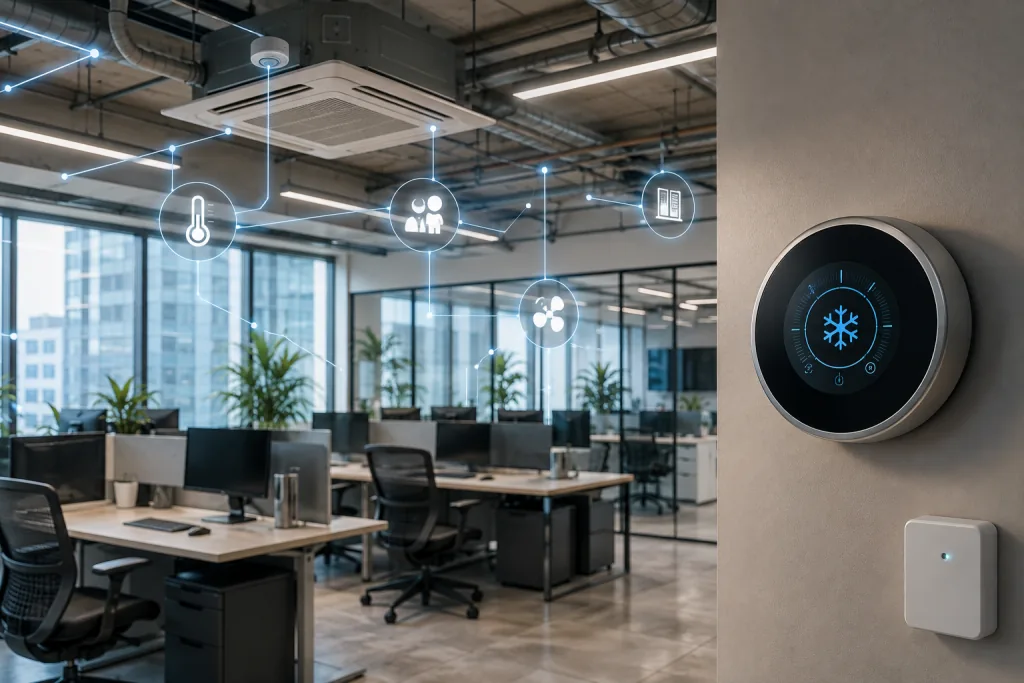
Office temperature is surprisingly difficult to get right. One employee feels cold while another wants the air conditioning turned down. Conference rooms can become warm during meetings, while empty offices continue receiving conditioned air. Sunlight, equipment, occupancy, building orientation, and outdoor conditions add even more variables.
Automated climate control systems for offices are designed to manage these variables more intelligently. Instead of relying entirely on fixed thermostat schedules and manual adjustments, automated systems can use sensors, controls, software, and connected HVAC equipment to respond to changing conditions.
Do they actually work? They can, but automation itself doesn’t guarantee better comfort or lower energy consumption. Results depend on the quality of the HVAC system, sensor placement, zoning strategy, control logic, commissioning, and how closely the system reflects the way people actually use the building.
What Is an Automated Office Climate Control System?
An automated climate control system monitors conditions inside an office and automatically adjusts heating, cooling, ventilation, or related building systems according to predetermined rules or real-time data.
A basic system might use programmable thermostats to change temperature settings according to working hours. More advanced systems can incorporate occupancy sensors, temperature sensors, humidity sensors, carbon dioxide sensors, smart thermostats, variable-speed equipment, motorized dampers, and building management software.
These components allow the HVAC system to respond to what’s happening rather than operating from a simple fixed schedule.
For example, an office may normally open at 8:00 a.m. A conventional scheduled system could begin cooling the entire space before employees arrive. An automated system with occupancy and environmental data might determine that certain zones aren’t occupied until later and adjust their operation accordingly.
Large commercial buildings may integrate climate control into a building automation system, commonly called a BAS or building management system. These platforms can coordinate HVAC equipment with lighting, occupancy, energy monitoring, and other building functions.
How Automated Climate Control Systems Work
The basic process involves three stages: sensing, decision-making, and response.
Sensors collect information about the office environment. Depending on the system, they may measure temperature, humidity, occupancy, carbon dioxide levels, outdoor conditions, or several variables simultaneously.
A controller or software platform evaluates that information against predefined settings. If the temperature rises above the desired range, for example, the system can request additional cooling. If a conference room becomes vacant, its HVAC zone may return to an energy-saving setting. The HVAC equipment then responds to those instructions.
More sophisticated systems continuously repeat this process and can consider multiple inputs simultaneously. Rather than simply responding to a thermostat reading, the system may account for occupancy, time of day, outdoor temperature, building thermal characteristics, and historical operating patterns.
Some platforms also provide dashboards that allow facilities teams to monitor conditions, review energy consumption, identify unusual performance, and adjust control strategies.
Do Automated Climate Control Systems Actually Work?
A properly designed automated climate control system can work very well, particularly when an office experiences substantial changes in occupancy throughout the day.
The greatest advantage comes from reducing the mismatch between HVAC operation and actual building demand. A conventional system may condition spaces according to fixed schedules even when nobody is using them. Automation can make the system more responsive.
That doesn’t mean every automated office will suddenly have perfect temperatures. Office comfort is affected by much more than the thermostat setting. Air movement, humidity, clothing, activity levels, sunlight, proximity to windows, workstation equipment, and individual preferences all affect how comfortable a person feels.
Automation is therefore better viewed as a tool for managing conditions more precisely, not as a way to create one universally comfortable temperature.
Its effectiveness also depends on the underlying HVAC equipment. Smart controls can’t fully compensate for undersized equipment, poorly balanced ductwork, inadequate ventilation, failing components, or badly designed zones.
Benefits of Using an Automated Climate Control System in Your Office
Occupancy-Based Controls Can Reduce Unnecessary HVAC Use
Occupancy sensing is one of the most practical applications of office climate automation.
Many commercial spaces aren’t occupied consistently. Meeting rooms may remain empty for hours before filling suddenly. Hybrid work schedules can leave portions of an office unused on certain days. Private offices, training rooms, cafeterias, and collaborative spaces may experience similarly unpredictable demand. Operating every area as though it’s continuously occupied can waste energy.
Occupancy sensors can allow the climate control system to adjust setpoints or ventilation strategies when rooms aren’t being used. Once occupants return, the system can bring conditions back toward the occupied setting.
The amount of adjustment needs careful consideration. Allowing a room to become excessively hot or cold can require substantial energy to restore comfort later. It can also create uncomfortable transition periods. Effective occupancy-based control therefore balances energy conservation with recovery time and expected patterns of use.
Smart Zoning Addresses Differences Across the Office
One thermostat controlling a large office can create significant comfort problems.
A south-facing workspace exposed to afternoon sunlight may need cooling while an interior room feels cold. A packed conference room produces considerably more heat than an empty hallway. Areas containing computers and other equipment may generate additional heat throughout the day.
Zoned climate control divides the building into areas that can be managed more independently.
Depending on the HVAC design, zones may use separate thermostats, sensors, variable air volume boxes, dampers, or dedicated equipment. Automation can then respond to the conditions within individual areas instead of treating the entire office as one environment.
Good zoning can improve both comfort and efficiency because conditioned air goes where it’s needed. Poor zoning creates the opposite problem. If areas with very different heating and cooling requirements share the same zone, sophisticated controls may still struggle to satisfy everyone. For this reason, the physical HVAC design and automation strategy need to work together.
Automated Ventilation Can Respond to Changing Occupancy
Temperature gets most of the attention in office climate discussions, but ventilation is equally important. A room occupied by two people has different ventilation requirements from the same room filled with twenty people. Automated systems may use occupancy information or carbon dioxide measurements as part of a demand-controlled ventilation strategy.
The purpose isn’t simply to cool a crowded room. Ventilation systems introduce and distribute outdoor air according to the building’s design and applicable requirements. When occupancy changes significantly, intelligently controlled ventilation can help avoid treating every space as though it were constantly operating at maximum occupancy.
However, ventilation shouldn’t be reduced without considering indoor air quality requirements. Building operators need to account for applicable codes, standards, equipment capabilities, and the characteristics of the space. Climate automation works best when energy efficiency and indoor environmental quality are treated as related goals rather than competing ones.
Automated Controls Can Help Reduce Office Energy Waste
Commercial HVAC systems can consume substantial amounts of energy, which makes unnecessary operation an obvious target for efficiency improvements.
Automated climate control can reduce waste by aligning HVAC operation more closely with occupancy and demand. Systems may use scheduling, setbacks, occupancy detection, variable-speed operation, optimized startup, temperature limits, and zone-level control.
Optimized startup is particularly useful. Instead of starting HVAC equipment at the same time every morning regardless of conditions, a control system can determine when heating or cooling needs to begin so that the building reaches its target conditions around the start of occupancy. The potential savings vary considerably.
A building with outdated controls, long operating hours, and unpredictable occupancy may have more opportunities for improvement than an office where the HVAC system is already carefully managed.
Energy performance should therefore be evaluated using actual consumption and operating data rather than assuming that installing smart controls automatically produces a particular percentage of savings.
Automation Can Improve HVAC Visibility for Facility Managers
One benefit that employees may never notice is better operational visibility. Traditional HVAC problems can remain hidden until employees complain or equipment fails. Connected climate control platforms can give facility managers more information about temperatures, equipment operation, setpoints, schedules, and sometimes energy consumption.
This information can make troubleshooting more systematic. Suppose employees repeatedly report that a particular area becomes hot every afternoon. Historical system data might reveal that the temperature increase corresponds with solar exposure, a change in occupancy, or an HVAC component failing to maintain the expected output.
Some building automation systems can also generate alarms when values move outside specified ranges or equipment behaves unexpectedly. These capabilities don’t eliminate the need for qualified HVAC professionals. They can, however, provide better information for maintenance and diagnostics.
Offices considering broader workplace improvements may benefit from connecting this approach with a larger office energy efficiency strategy, particularly when HVAC, lighting, occupancy, and equipment schedules interact.
Considerations Before Installing Automated Climate Control Systems in Your Office
Temperature Sensors Need to Represent the Space Accurately
Automated systems depend heavily on sensor data. If that data doesn’t accurately represent conditions in the occupied space, the resulting decisions can be poor.
Consider a temperature sensor installed where direct sunlight reaches it every afternoon. The sensor may report a warmer temperature than employees experience elsewhere in the room, causing the system to increase cooling unnecessarily. Sensors located near supply vents, exterior doors, heat-producing equipment, windows, or poorly insulated surfaces can create similar problems.
Occupancy sensors have limitations too. A sensor may fail to detect someone sitting relatively still at a desk, depending on the technology and placement. The climate system could then assume that an occupied room is vacant.
Sensor selection and placement aren’t minor installation details. They’re fundamental to system performance. Periodic calibration and maintenance also matter because sensors can drift or fail over time. Automated decisions are only as reliable as the information being supplied to the controller.
Humidity Control Can Make Office Temperatures Feel Different
Temperature alone doesn’t determine comfort. Humidity affects how people perceive indoor conditions. A warm, humid office can feel significantly less comfortable than another space at a similar temperature with better humidity control.
Excessive humidity may also contribute to condensation and moisture-related building problems. Very dry indoor air can create a different set of comfort concerns.
Some automated climate control systems monitor relative humidity and coordinate HVAC operation accordingly. The specific strategy depends on the climate, equipment, building envelope, and system design. This is one reason simply installing smart thermostats isn’t equivalent to implementing comprehensive climate control.
A thermostat may manage temperature effectively while providing little control over humidity or ventilation. Offices that need more precise environmental management may require integrated HVAC controls capable of responding to several variables rather than temperature alone.
Smart Thermostats and Building Automation Systems Aren’t the Same
The term “smart climate control” covers a wide range of technologies.
A smart thermostat is often the simplest entry point. It can provide scheduling, remote access, occupancy features, and more convenient temperature management. For small offices with relatively straightforward HVAC systems, that may be sufficient.
Building automation systems operate on a larger scale. A BAS can monitor and control multiple pieces of equipment across numerous zones. It may integrate air handlers, chillers, boilers, rooftop units, variable air volume systems, ventilation equipment, lighting, meters, and other building infrastructure.
The appropriate level of automation depends heavily on office size and complexity. Installing a sophisticated BAS in a tiny office may add unnecessary cost and complexity. Conversely, relying on a handful of independent smart thermostats in a large multi-zone building may provide insufficient coordination.
The technology should match the building rather than the other way around.
Employee Temperature Preferences Remain a Challenge
One of the biggest limitations of automated climate control has nothing to do with technology. People simply have different comfort preferences.
Two employees sitting next to each other can experience the same temperature differently. Clothing, metabolism, activity, air movement, sunlight, workstation location, and personal preference all contribute. Constantly changing the thermostat in response to individual complaints can create temperature swings and conflict.
Automated systems can reduce some of these problems through better zoning and more stable environmental control. Certain advanced workplace systems can also collect comfort feedback and help facility teams identify persistent patterns.
However, there are practical limits to personalization in shared spaces. The goal should generally be to maintain reasonable comfort conditions across occupied zones while identifying areas with consistent problems. If one cluster of desks generates repeated complaints, the issue might involve airflow, solar heat gain, or zoning rather than the central temperature setpoint.
Building Design Determines How Much Automation Can Accomplish
A climate control system can’t be evaluated independently from the building itself. Poor insulation, uncontrolled solar heat gain, air leakage, inadequate shading, aging windows, and other envelope issues can substantially increase heating and cooling loads.
Automation may manage the resulting conditions more intelligently, but it doesn’t remove the underlying cause. The same principle applies to HVAC design. If a conference room and lightly occupied workspace share a zone, the system may struggle when the conference room fills. Adding more sophisticated software doesn’t physically separate those loads.
Before investing heavily in controls, building owners should understand whether comfort problems originate from controls, HVAC equipment, zoning, airflow, the building envelope, or a combination of factors.
Sometimes a control upgrade is the right solution. In other situations, balancing airflow, repairing equipment, improving insulation, or redesigning a zone may produce a greater improvement.
Commissioning Is Critical to Getting the Expected Results
Automated systems can be installed correctly from a hardware perspective and still perform poorly because the control sequences aren’t properly configured. Commissioning verifies that sensors, equipment, controls, and software operate as intended.
For example, an occupancy sensor may technically communicate with the building automation system, but the HVAC system may not respond appropriately when the room becomes vacant. A temperature setback may be configured so aggressively that employees arrive to an uncomfortable office every morning.
Control systems should also be reviewed after employees have used the building. Real-world occupancy can differ from assumptions made during installation. Meeting rooms may be used more frequently than expected, hybrid schedules may change, departments may relocate, or employees may begin arriving earlier.
Recommissioning and ongoing optimization help prevent an initially efficient system from becoming poorly matched to the building years later.
Cybersecurity and Network Reliability Deserve Attention
Connected HVAC controls introduce considerations that traditional standalone thermostats don’t.
Internet-connected thermostats, cloud platforms, remote dashboards, and networked building controllers may exchange operational information across local or external networks. Organizations need to consider how these devices are configured, updated, accessed, and protected.
Default credentials should be changed, access should be limited appropriately, and software or firmware updates should be managed as part of normal building technology maintenance.
Network architecture matters as well. Building systems shouldn’t be connected carelessly to business networks simply for convenience. Organizations should involve both facilities and IT teams when implementing connected building technology. The facilities team understands HVAC operation, while IT and cybersecurity professionals can address network access, device management, authentication, and other digital risks.
Reliability also matters. Critical climate functions should be designed so that a temporary internet outage doesn’t leave the office without appropriate HVAC operation.
How to Evaluate Whether Climate Automation Is Worth the Cost
The business case depends on what problem the organization is trying to solve.
For an office with frequent hot and cold complaints, better zoning and controls may improve workplace comfort. For a building with unpredictable occupancy, automation may reduce unnecessary HVAC operation. For facilities teams struggling to understand equipment performance, centralized monitoring may provide substantial operational value.
Start with baseline data. Review energy bills, HVAC schedules, comfort complaints, maintenance history, occupancy patterns, and the capabilities of the existing control system. This creates a reference point against which improvements can be measured.
Then consider the full cost of implementation. Hardware is only part of the investment. Installation, system integration, commissioning, software subscriptions, network requirements, sensor replacement, training, and ongoing maintenance may also contribute to total ownership cost.
Payback shouldn’t be evaluated through energy savings alone. Comfort, equipment visibility, maintenance efficiency, and operational control can also provide meaningful value.
Measure Performance After Installation
One of the advantages of automation is that it can make performance more measurable, but organizations still need to define what success looks like.
Energy use is an obvious metric. Comparing consumption before and after installation can provide useful information, particularly when weather and occupancy differences are considered. Comfort complaints are another useful indicator. If employees continue reporting the same hot and cold areas, the automation strategy may need adjustment.
Facilities teams can also monitor how long equipment operates, whether zones regularly exceed their desired ranges, how often employees override settings, and whether unusual patterns appear in system data. Frequent manual overrides are particularly informative. They can indicate that automated settings don’t reflect employee schedules or comfort needs.
Treating installation as the beginning of the optimization process rather than the end helps organizations get more value from the technology.
Automated Climate Control Works Best as Part of a Smarter Office
Automated climate control systems for offices can work extremely well when they solve specific building problems and are supported by suitable HVAC equipment. Occupancy-based operation, zoning, optimized schedules, environmental sensors, and centralized controls can help offices respond more precisely to changing conditions while reducing unnecessary heating and cooling.
The limitations matter just as much. Automation can’t repair poorly designed ductwork, eliminate individual differences in thermal comfort, correct inadequate HVAC capacity, or compensate indefinitely for inaccurate sensors and neglected maintenance.
The strongest results come from treating climate automation as part of the building’s overall operating strategy. Evaluate the physical HVAC system first, establish meaningful performance goals, choose controls appropriate for the size and complexity of the office, and continue monitoring the system after installation.
With that approach, automated climate control systems for offices can deliver more than convenient thermostat control. They can provide a practical framework for managing comfort, ventilation, energy use, and building performance more intelligently.
Read next
-
 Why You Should Initiate Thermal Comfort Surveys in Your Workplace (and How to Do It)
-
 Office Temperature and Ventilation Regulations Every Business Owner Should Know
-
 Your Complete Guide to Proper Office Humidity Levels and Ventilation
-
 Office Ergonomics Checklist: How to Build a Comfortable and Productive Workspace