Standing desks get most of the attention, but for many people, they’re not the most practical starting point. Replacing an entire desk can be expensive, time-consuming, and sometimes unnecessary. A standing desk converter solves that problem by transforming your existing desk into a sit-stand workstation—without a full overhaul.
Done right, it delivers many of the same ergonomic benefits as a full standing desk. Done poorly, it creates new issues like cramped space, awkward monitor height, and limited movement. This guide explains what standing desk converters are, how they actually perform in real setups, when they make sense, what to look for, and how to avoid the common mistakes that lead to disappointing results.
What Is a Standing Desk Converter?
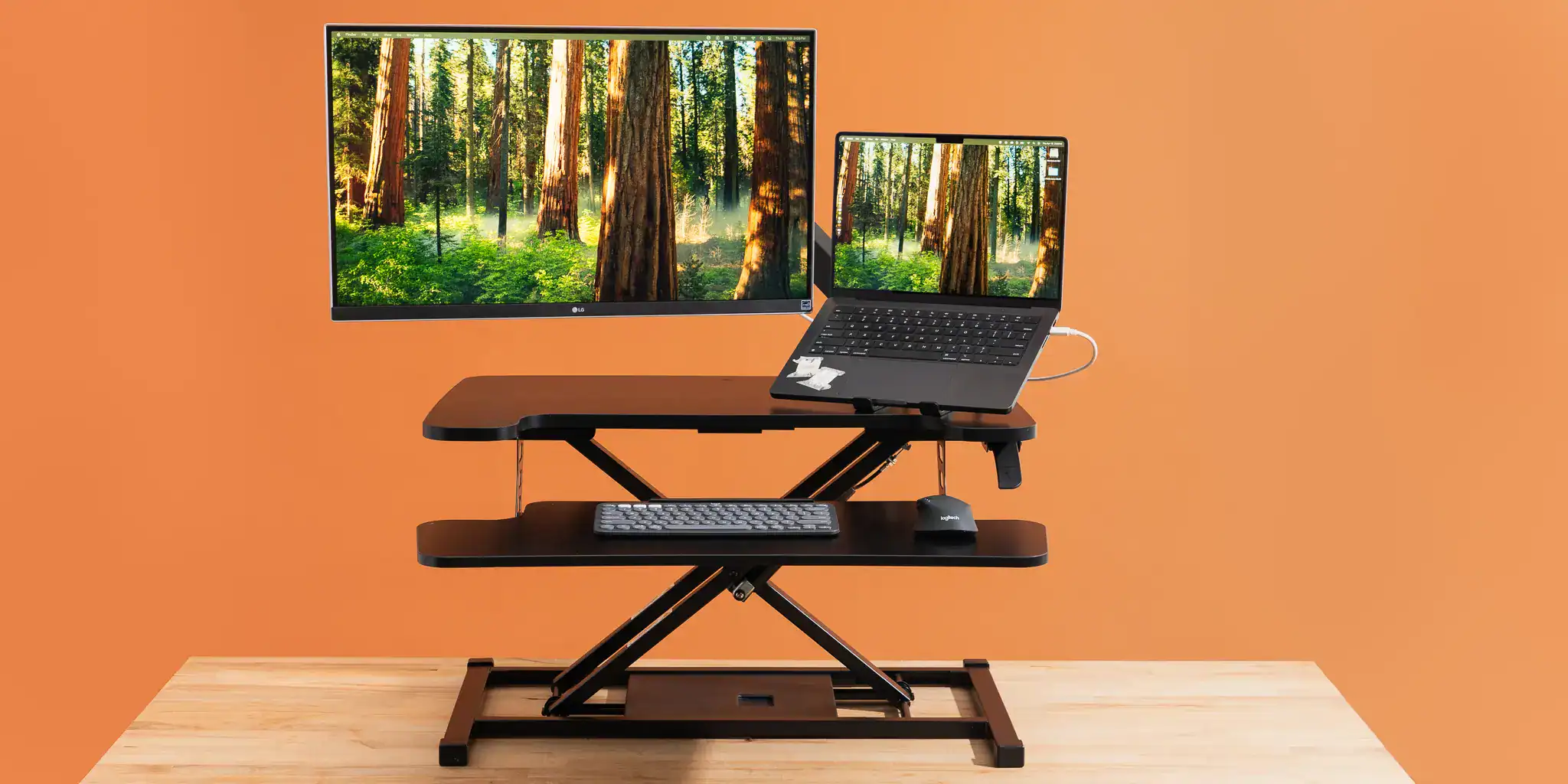
A standing desk converter is an adjustable platform that sits on top of your existing desk and raises your working area to standing height. Instead of moving the entire desk up and down, the converter lifts your keyboard, mouse, and monitor together. Most models use either a spring-assisted or gas-assisted mechanism, allowing you to switch between sitting and standing with a single motion.
What makes converters different from full standing desks is how they integrate into your setup. You’re not rebuilding your workspace—you’re adding a layer on top of it. That distinction affects everything from ergonomics to usability.
Why Standing Desk Converters Matter
The biggest barrier to improving a workspace is usually friction. People know they should move more, adjust their posture, or reduce sitting time—but if the setup makes those changes inconvenient, they don’t happen consistently.
A standing desk converter lowers that barrier. It allows you to introduce height variation into your day without committing to a full desk replacement. That makes it one of the easiest entry points into a more ergonomic setup.
However, the value isn’t just accessibility—it’s whether the converter actually supports proper positioning. A poorly designed converter can lock you into awkward heights, push your monitor too close, or create a cramped working area. That’s why understanding how they work in practice matters more than just knowing what they are.
How Standing Desk Converters Work in Real Use
On paper, a converter simply raises your workspace. In practice, it changes how your entire desk functions. When you lift a converter, everything on it moves upward at once. This includes your monitor and keyboard, which need to stay aligned relative to your body. If the design doesn’t account for this, you can end up with a screen that’s too low or a keyboard that’s too high. This is where many setups go wrong.
Better converters separate the keyboard tray from the monitor platform, allowing each to sit at the correct height. This creates a more natural standing posture and prevents the need for awkward adjustments. Another factor is depth. Converters sit on top of your desk, which pushes your working area slightly forward. If the platform is too shallow, your monitor may end up too close, forcing you into a cramped viewing position. If it’s too deep, you may lose usable desk space behind it.
In other words, a converter doesn’t just add height—it reshapes your workspace.
Standing Desk Converter vs Full Standing Desk
The decision between a converter and a full standing desk comes down to how permanent and flexible you want your setup to be. A converter is an overlay. It works within the limitations of your existing desk, which means less cost and faster setup, but also less freedom in positioning. A full standing desk replaces the entire structure. It offers more space, cleaner integration, and greater flexibility, but requires a larger investment.
In day-to-day use, the biggest difference shows up in how natural the setup feels. A well-designed standing desk allows you to move freely without thinking about the mechanics. A converter requires more awareness of space, positioning, and layout. That doesn’t make one better than the other—it depends on how you work and what constraints you have.
The Benefits of Using a Standing Desk Converter

It Makes Movement Accessible Instead of Optional
Most people don’t avoid standing because they don’t want to—they avoid it because their setup makes it inconvenient. If switching positions means rearranging your desk, moving equipment, or interrupting your workflow, you simply won’t do it often enough for it to matter. That’s why many “ergonomic intentions” fail in practice.
A standing desk converter removes that friction. When the entire workspace lifts in one motion, switching positions becomes something you can do mid-task without breaking focus. That’s what turns movement into a habit instead of something you have to remember. Over time, this changes how your workday feels. Instead of long, uninterrupted sitting blocks followed by discomfort, you naturally rotate between positions before strain builds up.
It Preserves Your Existing Setup
A full desk replacement often forces you to rethink everything—layout, cable management, storage, even how your space functions. A converter avoids that disruption. You keep your existing desk, your familiar layout, and the way your workspace is organized. The converter simply adds vertical flexibility on top of it. This matters more than it seems, especially in setups that are already dialed in for productivity.
It also reduces the risk of overcorrecting. Instead of committing to a completely new system, you’re layering improvement onto something that already works—making it easier to refine rather than rebuild.
It Creates a Transitional Path to Better Ergonomics
One overlooked benefit of a standing desk converter is that it reveals weaknesses in your current setup. When you start switching between sitting and standing, issues become more obvious. Your monitor might feel too low, your keyboard position might be off, or your desk depth might not support a comfortable viewing distance.
This kind of feedback is valuable. It helps you understand what’s actually causing discomfort, rather than guessing or making blind upgrades. For many people, a converter becomes a stepping stone—not just physically, but in understanding how their workspace should function.
It Adapts to Real-Life Constraints
Not every workspace is designed around ergonomics. You might be working with limited space, shared desks, fixed furniture, or a setup that needs to serve multiple purposes throughout the day. In these cases, a full standing desk can feel excessive or impractical.
A converter fits into these constraints more easily. It can be repositioned, removed, or adjusted depending on how the space is being used. This flexibility makes it far more adaptable in environments where your desk isn’t dedicated solely to work.
It Helps You Build a Sustainable Sit-Stand Routine
A lot of ergonomic advice focuses on what you should do—stand more, move more, change positions regularly. The challenge is making that sustainable.
A converter supports this by making transitions easy and repeatable. You don’t have to plan when to stand or commit to long standing sessions. You simply adjust when it feels right—during a call, between tasks, or when you notice tension building. This leads to a more realistic routine, where movement is integrated into your workflow instead of competing with it.
Where Standing Desk Converters Fall Short
Converters are not a perfect solution, and understanding their limitations is what prevents disappointment.
Limited Workspace
Converters sit on top of your existing desk, which means they take up part of your usable surface area. This becomes noticeable quickly if your setup includes multiple monitors, accessories, or anything that requires room to move—like writing, note-taking, or using external equipment. What initially feels like a simple add-on can start to feel crowded once everything is in place.
Height Range Limitations
Not all converters adjust to the same heights, and this is where compatibility issues often show up. If the converter doesn’t go high enough, you’ll end up looking down at your screen while standing. If it doesn’t go low enough, your seated position may feel cramped or misaligned. Both scenarios lead to compromised posture, even if everything else is set up correctly. This is especially important for users who fall outside average height ranges, where small limitations in adjustment become much more noticeable.
Stability Issues at Full Height
Stability often changes depending on the height of the converter. Many models feel solid when lowered but become noticeably less stable when raised. At standing height, even small movements—like typing or adjusting your hands—can cause wobble. This affects more than just comfort. It creates a subtle sense of instability that makes the setup feel less reliable and more fatiguing to use over time.
Higher-quality designs maintain their structure across the full range of motion, which is where the real difference shows up in daily use.
Types of Standing Desk Converters
X-Frame Converters
X-frame converters use a scissor-style mechanism to lift the platform. They’re often more affordable and compact, but the trade-off is stability and usable space. As they extend upward, the structure can feel less stable, and the platform size is often limited. They work best for lighter setups and smaller work areas.
Z-Lift Converters
Z-lift designs move vertically rather than outward. This keeps the platform more stable and reduces the forward shift that can happen with other designs. It also tends to provide a more consistent working position across different heights. For most users, this design offers a better balance between usability and stability.
Electric Converters
Electric converters remove the need for manual adjustment. They offer smoother transitions and are easier to use frequently, but they also add cost and complexity. In smaller setups, the added convenience may not outweigh the trade-offs.
Corner Converters
Corner models are built to fit L-shaped desks or wider workspaces. They provide more surface area, making them suitable for multi-monitor setups, but they require more space and careful positioning.
What to Look for in a Standing Desk Converter
Most converters look similar at a glance, but the difference shows up the moment you start using them daily. A good converter should disappear into your workflow. You shouldn’t be thinking about height compromises, wobble, or where to place your hands. When those issues show up, it’s usually because one of the core design elements is off.
Here’s what actually determines whether a converter works or becomes frustrating.
Keyboard and Monitor Height Separation
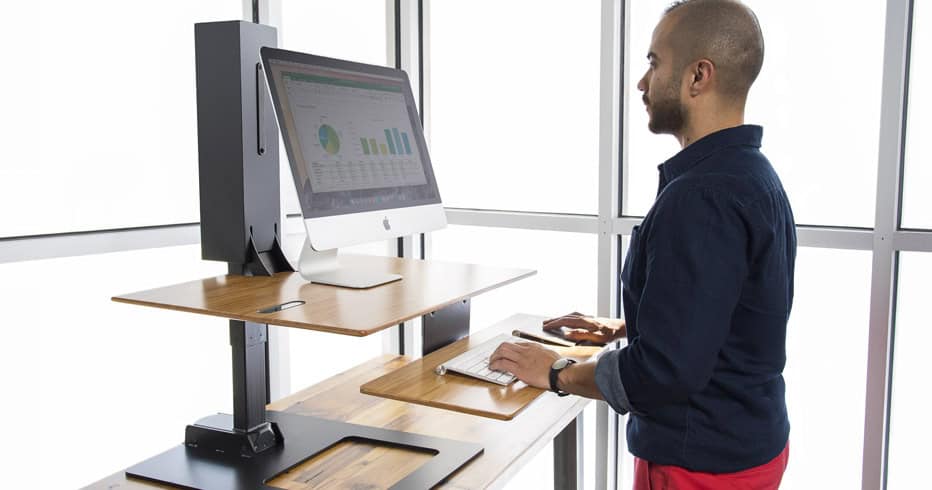
This is the single most important factor—and the most commonly overlooked. Your keyboard and monitor cannot sit at the same height if you want a neutral posture. Your hands need to stay around elbow level, while your screen needs to sit higher so your eyes can look straight ahead or slightly downward. When both are on one flat surface, one of two things happens: either your keyboard is too high, which strains your shoulders and wrists, or your monitor is too low, which pulls your head forward.
Converters with separate tiers solve this by allowing each element to sit where it should. Without this separation, the entire setup becomes a compromise, no matter how good the rest of the converter is.
Stability at Full Height
Many converters feel stable when sitting, but that’s not where they’re tested. At full standing height, small weaknesses become obvious. You might notice a slight wobble when typing or movement when resting your hands. Over time, this creates a subtle but constant distraction.
More importantly, it changes how you interact with the setup. If the platform doesn’t feel stable, you naturally become more rigid. You type more cautiously, adjust less, and avoid movement—all of which reduce the ergonomic benefit of standing in the first place.
A stable converter allows you to work normally, without adapting your behavior to the equipment.
Platform Size and Depth
Surface area isn’t just about fitting your devices—it determines how naturally you can position them. If the platform is too shallow, your monitor ends up too close. This forces you into a cramped viewing distance, which often leads to leaning back or adjusting your posture in unnatural ways. If it’s too small overall, you’ll constantly rearrange your keyboard and mouse just to stay within the working area.
A properly sized platform supports your natural spacing. Your screen sits at a comfortable distance, your hands have room to move, and your setup feels open rather than constrained.
Adjustment Mechanism
The ease of adjustment directly affects behavior. If raising or lowering the converter feels heavy, jerky, or awkward, you’ll avoid doing it frequently. What starts as a sit-stand setup quickly turns into a mostly-sitting setup with occasional standing.
On the other hand, a smooth, controlled mechanism makes switching positions feel effortless. You can adjust mid-task without thinking about it, which is what allows movement to become part of your routine. This is one of the few features that directly impacts consistency—how often you actually use the converter the way it’s intended.
Height Range
Height range determines whether the converter fits your body at both ends—sitting and standing. If the maximum height is too low, your screen will sit below eye level when standing, forcing you to look down. If the minimum height is too high, your seated position becomes cramped, raising your arms and shoulders unnaturally.
These issues aren’t always obvious at first, but they become noticeable over longer sessions. The right height range allows you to maintain proper alignment in both positions without compromise. If the converter can’t accommodate your natural posture, everything else becomes a workaround.
How to Set Up a Standing Desk Converter Properly
A converter only works if it’s set up with proper alignment. Your keyboard should sit at a height where your elbows remain relaxed, and your wrists stay neutral. Your monitor should be positioned so your eyes look slightly downward, not your neck.
Distance also matters. Because converters sit on top of your desk, it’s easy to end up too close to the screen. Adjust your positioning so you can view the entire display comfortably without leaning forward.
Finally, treat the converter as part of a dynamic setup. Switch positions regularly, adjust as needed, and avoid staying in one position for too long.
Common Mistakes to Avoid
Underestimating How Much Space a Converter Needs
Standing desk converters don’t just sit on your desk—they change how your entire workspace is used. Many users assume their current desk has enough room, only to find the setup feeling cramped once the converter is in place. The platform takes up surface area, pushes your working position forward, and can limit space for accessories or writing. This becomes especially noticeable in smaller desks or multi-monitor setups, where every inch matters.
Choosing a Flat Platform Without Keyboard Separation
One of the most common design mistakes is using a converter where the keyboard and monitor sit on the same level. This creates an unavoidable trade-off. If the platform is set for proper keyboard height, the monitor is too low. If it’s set for the monitor, the keyboard is too high. Either way, your posture is compromised.
Converters with separate keyboard trays solve this by allowing each element to sit where it naturally belongs, which is essential for long-term comfort.
Assuming All Converters Are Stable
Stability varies more than most people expect—and it often changes depending on height. A converter that feels solid when lowered can become noticeably unstable when raised. Even a slight wobble during typing or resting your hands can make the setup feel unreliable and distracting. Over time, this affects how you work. You adjust less, move less, and become more rigid just to avoid the instability.
Treating It as a One-Time Adjustment
A standing desk converter is designed for movement, but many people end up using it like a fixed platform. They raise it once, try standing for a while, then default back to sitting—and rarely adjust it again. This removes the core benefit of the setup.
The value comes from switching positions regularly and adapting throughout the day. When used dynamically, the converter supports better habits. When treated as static, it becomes just another elevated surface.
Are Standing Desk Converters Worth It?
They are—when they fit your setup and how you work. A converter provides a practical way to introduce movement into your day without replacing your desk. It lowers the barrier to better ergonomics and makes posture changes more accessible.
However, the experience depends heavily on the design and how well it aligns with your workspace. When chosen carefully and used correctly, a standing desk converter can significantly improve how your desk feels day to day.
Final Thoughts
A standing desk converter is not just a shortcut to a standing desk—it’s a different approach to building a flexible workspace. It works best when you understand its role: an adaptable layer that adds movement to your setup without replacing it entirely.
If your goal is to create a more comfortable, dynamic way of working without rebuilding your entire desk, a well-chosen converter can do exactly that. From here, explore our guide to the best standing desk converters, detailed reviews, and comparisons to find the right fit for your setup.
Frequently Asked Questions
Are standing desk converters as good as full standing desks?
They can be effective, but the experience is different. A converter works within the limits of your existing desk, which means less space and slightly more constraints in positioning. A full standing desk feels more integrated and flexible. The right choice depends on whether you want a quick upgrade or a long-term, fully optimized setup.
Do standing desk converters actually improve ergonomics?
Only if they’re set up correctly. A converter can improve posture and reduce strain, but poor designs—especially those without keyboard separation—can create new alignment issues. The benefit comes from proper positioning, not just raising your workspace.
How much desk space do I need for a standing desk converter?
Converters sit on top of your desk and push your working area forward. If your desk is already tight, the setup can feel cramped. It’s important to consider both surface area and depth, not just whether the converter physically fits.
Can I use a dual monitor setup with a standing desk converter?
Yes, but it depends on the platform size and stability. Larger converters can support dual monitors, but smaller or less stable models may struggle with weight and balance. In some cases, using monitor arms alongside the converter creates a better setup.
Are standing desk converters stable when raised?
It depends on the design. Higher-quality converters remain stable across their full height range, while cheaper models often develop wobble at standing height. Since this is where you’ll be working, stability in the raised position is critical.
How often should I switch between sitting and standing?
There’s no fixed rule, but consistency matters more than duration. Short, regular transitions tend to be more effective than long, infrequent standing sessions. The goal is to avoid staying in one position long enough for discomfort to build.
Do I need an anti-fatigue mat with a standing desk converter?
If you plan to stand regularly, it makes a noticeable difference. Standing on hard flooring for extended periods leads to pressure buildup and fatigue. A standing desk mat improves comfort and makes it easier to stay on your feet without discomfort forcing you back to sitting.
Are converters suitable for tall or short users?
Only if the height range matches your needs. Some converters don’t adjust high or low enough for certain users, which leads to compromised posture. Checking height range is especially important if you’re outside the average height range.
Can I leave my converter in standing mode all day?
You can, but it’s not ideal. The goal is variation. Staying in any one position—sitting or standing—for too long leads to discomfort. Converters are most effective when used to alternate between positions throughout the day.