If standing desks changed how we work, ergonomic chairs are what make sitting sustainable. The reality is simple: most people still spend a significant part of their day seated. And while reducing sitting time is important, completely avoiding it is unrealistic for many jobs. That’s why the goal isn’t to eliminate sitting. It’s to sit better.
An ergonomic chair is designed to support your body in a way that reduces strain, improves posture, and makes long work sessions more comfortable. But not all chairs labeled “ergonomic” actually deliver on that promise. This guide breaks down everything you need to know about ergonomic chairs: what they are, how they work, what features matter, how to set one up properly, and how to choose the right chair for your needs.
What Is an Ergonomic Chair?
An ergonomic chair is designed to support how your body is meant to sit, not how most chairs force you to sit. The key difference is adjustability. Instead of locking you into a fixed position, an ergonomic chair allows you to fine-tune how it fits your body. Seat height, lumbar support, armrests, and backrest angle can all be adjusted so the chair works with your natural alignment rather than against it.
At a fundamental level, the goal is simple: support your spine, reduce pressure on your joints, and make it easier to sit without strain building up over time. But what matters most is not “perfect posture.” Good ergonomics is not about sitting upright all day and holding a rigid position. It’s about creating a setup where your body can stay comfortable while shifting, adjusting, and moving naturally. A well-designed ergonomic chair doesn’t force posture. It supports it in a way that feels effortless.
Why Ergonomic Chairs Matter
Most discomfort from sitting doesn’t come from sitting itself. It comes from how you sit, and how long you stay in that position. When a chair doesn’t support your body properly, small inefficiencies start to add up. Your lower back loses its natural curve, your shoulders begin to carry tension, and your hips take on uneven pressure. None of this feels extreme at first, but over hours, it turns into stiffness, fatigue, and reduced focus. That’s why poorly designed chairs often lead to familiar issues like lower back pain, tight shoulders, or general discomfort during long work sessions.
An ergonomic chair addresses this by supporting your body in a way that reduces the need for constant compensation. It helps distribute your weight more evenly, keeps your spine in a more natural position, and makes it easier to sit without gradually collapsing into poor posture. For anyone who works at a desk regularly, this isn’t a small upgrade. It’s one of the most important factors in how your workday feels.
How Ergonomic Chairs Work
Ergonomic chairs are built around how your body naturally aligns and moves, not just how it looks in a static “ideal” position. When properly adjusted, they create a setup where your feet are grounded, your hips are stable, and your spine is supported without effort. Your lower back maintains its natural curve, your shoulders stay relaxed instead of lifting or rounding forward, and your head remains aligned rather than drifting toward your screen.
What makes this effective is not just positioning. It’s how the chair supports you as you move. A good ergonomic chair doesn’t lock you into place. It allows you to lean back slightly, shift your weight, or change posture without losing support. These small, continuous adjustments are what prevent stiffness and reduce the buildup of tension over time.
In that sense, the chair isn’t just holding you up. It’s working with your body throughout the day, adapting to how you sit rather than forcing you into a fixed position.
Key Features of a Good Ergonomic Chair

Not all ergonomic chairs are built the same, and more importantly, not all “features” are equally important. Many chairs look impressive on paper but fail where it matters: real-world comfort over long hours. The key is understanding how each feature affects your body throughout the day, not just what it does, but why it matters.
Adjustable Seat Height
Seat height is where your entire ergonomic setup begins, and getting it wrong creates a chain reaction across your posture. When your chair is too high, your feet lift off the floor, placing pressure under your thighs and reducing circulation. Too low, and your knees rise above your hips, tilting your pelvis backward and pulling your spine into a slouched position. Neither is sustainable over long hours.
The correct height allows your feet to rest flat, your knees to sit roughly level with or slightly below your hips, and your weight to distribute evenly across your lower body. This neutral base supports proper spinal alignment. If this foundation is off, every other adjustment becomes a workaround instead of a solution.
Lumbar Support
Your lower spine has a natural inward curve, but most chairs fail to support it. When that curve isn’t supported, your body compensates by collapsing forward into a slouched position, increasing pressure on your spinal discs and creating fatigue in your lower back.
Good lumbar support fills that gap and maintains your spine’s natural shape without forcing it into an unnatural position. But what matters most isn’t just having lumbar support. It’s whether it can be adjusted.
A fixed lumbar support often misses the right spot entirely. The best chairs allow you to fine-tune both the height and depth so that it matches your body. When positioned correctly, it reduces the effort required to sit upright. Your body no longer has to “hold” posture. It’s supported into it.
Backrest Recline and Tilt
Sitting perfectly upright at 90 degrees might sound ideal, but in practice, it places more pressure on your spine than a slight recline. A reclined position, typically just past upright, helps distribute your weight more evenly across the backrest, reducing strain on your lower back and allowing your core to relax slightly. This is why many people feel more comfortable leaning back than sitting rigidly upright.
What makes the biggest difference is dynamic movement. A chair that allows controlled reclining and responds to your body encourages small, natural adjustments throughout the day. That movement prevents stiffness and reduces the buildup of tension that comes from staying in one fixed position too long.
Seat Depth Adjustment
Seat depth quietly determines whether your chair supports you properly or works against you. When the seat is too deep, it presses into the back of your knees, which can restrict circulation and force you to sit forward without using the backrest. Over time, that leads to poor posture and unnecessary strain.
If it’s too shallow, your thighs aren’t fully supported, and more pressure shifts into your hips. This often shows up as discomfort during longer sessions, even if everything else seems correctly adjusted.
The ideal position leaves a small gap between the seat edge and the back of your knees. This allows proper blood flow while still supporting your legs. It’s a subtle adjustment, but one that significantly improves long-term comfort, especially for users who don’t fall within average height ranges.
Armrest Adjustability
Armrests directly influence how much tension builds in your shoulders and neck throughout the day. If they sit too high, your shoulders lift slightly and stay engaged, creating constant tension. If they’re too low, your arms lack support, which usually leads to leaning forward or collapsing toward your desk.
Properly adjusted armrests allow your arms to rest naturally, keeping your shoulders relaxed and your upper body aligned. This becomes especially important during repetitive tasks like typing and mouse use, where even small inefficiencies can compound over time.
The best setups allow you to adjust armrests so they align not just with your body, but also with your desk height. When everything lines up, the strain across your upper body drops noticeably.
Breathable Materials
Material choice plays a bigger role than most people expect, especially over long work sessions. Non-breathable materials trap heat, which gradually leads to discomfort, increased sweating, and constant repositioning. That kind of distraction doesn’t just affect comfort. It affects focus.
Mesh designs allow airflow and adapt more dynamically to your body, while cushioned chairs offer a softer initial feel but can retain heat over time. The right choice depends on your environment and how long you typically sit.
What matters most is consistency. A chair that feels comfortable after several hours, not just the first few minutes, is the one that actually supports your workflow.
Stability and Build Quality
An ergonomic chair isn’t static. It’s a system of moving parts that need to perform consistently over time. Lower-quality chairs often develop issues that directly affect comfort: wobbling bases, weak tilt mechanisms, flattened seat padding, or loose components. These aren’t just durability problems. They compromise the ergonomic function of the chair itself.
A well-built chair feels stable at any height or angle, adjusts smoothly without resistance, and maintains consistent support even after extended use. This is one area where cutting corners tends to backfire. A chair that fails structurally will eventually fail ergonomically, too.
Types of Ergonomic Chairs
Different users have different needs, and ergonomic chairs come in various styles. Choosing the right type of chair comes down to how you work, not just what looks appealing.
High-Back Ergonomic Chairs
High-back chairs provide full support across your back, shoulders, and often your head. This makes them especially effective for long work sessions where sustained support matters.
They distribute your weight across a larger surface area, which reduces fatigue and makes reclining more comfortable. If you spend most of your day seated and rely on back support consistently, this type of chair tends to offer the most complete experience.
Mid-Back Chairs
Mid-back chairs focus on supporting the lower and mid-spine without extending to the shoulders or head. They work well in setups where you’re moving more frequently or not leaning back as often. While they offer less full-body support, they can feel lighter and less restrictive, especially in environments where flexibility matters more than full-time seated comfort.
Mesh Chairs
Mesh chairs combine airflow with flexible support, making them a popular choice for long hours and warmer environments. They adapt to your body more dynamically than rigid surfaces, which can improve comfort over time. However, material quality is critical. Lower-grade mesh can lose tension and sag, reducing support where you need it most.
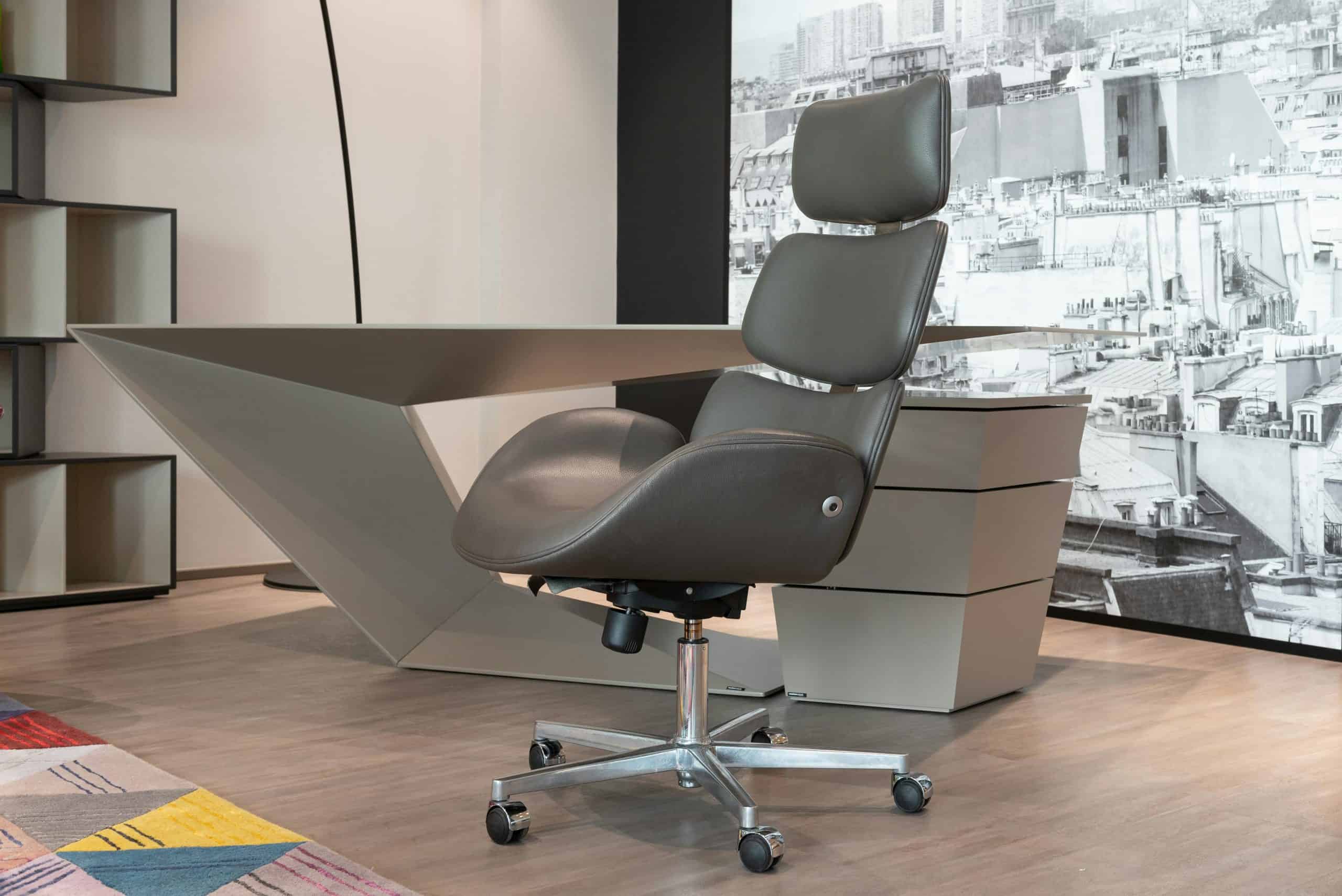
Executive Ergonomic Chairs
Executive chairs prioritize cushioning and visual appeal, which can make them feel comfortable initially. However, many lack the adjustability needed for true ergonomic support. They’re better suited for shorter sessions or users who prioritize softness over precision adjustments, but they may not hold up as well for long, daily use.
Kneeling Chairs
Kneeling chairs shift your weight forward and open your hip angle, which can reduce lower back pressure and encourage a more upright posture. That said, they limit movement variety and can place strain on your knees over time. They’re best used occasionally, as part of a rotation, rather than as your primary chair.
Saddle Chairs
Saddle chairs position your hips in a more natural, open angle, promoting upright posture and mild core engagement. They can be effective for active sitting, but they require adjustment and may feel unfamiliar at first. Because of their design, they’re more commonly used in specialized environments rather than traditional desk setups.
Benefits of Using an Ergonomic Chair
Improved Posture
Most people don’t sit poorly because they want to. They sit poorly because their chair forces them into it. When a chair lacks proper support, your body compensates. Your pelvis tilts backward, your lower back flattens, and your upper body collapses forward. Over time, that becomes your default sitting position.
An ergonomic chair changes this by supporting your body at key points, especially the lower back and hips, so you don’t have to “hold” yourself upright. Instead of constantly correcting your posture, the chair makes a neutral position the path of least resistance. This is why good posture in an ergonomic chair feels natural, not forced. You’re not actively trying to sit properly. The setup is doing most of the work for you.
Reduced Back and Neck Pain
A lot of discomfort doesn’t come from obvious bad posture. It comes from small, sustained inefficiencies. For example, if your chair doesn’t support your lower back, your spine takes on more load than it should. If your armrests are too low, your shoulders compensate. If your seat depth is off, your hips shift forward, pulling your entire posture out of alignment. These are subtle issues, but they stack up over hours.
An ergonomic chair reduces these hidden stress points by aligning your body correctly from the ground up. When your hips, spine, and shoulders are supported in the right positions, there’s less need for muscular compensation. The result isn’t just less pain. It’s less buildup of strain throughout the day.
Better Comfort During Long Work Sessions
Discomfort doesn’t always feel dramatic. It often shows up as constant micro-adjustments. Shifting in your seat. Rolling your shoulders. Leaning forward, then back again. None of these feels like a major interruption, but they fragment your attention.
When your chair is properly adjusted, those constant corrections drop significantly. You’re not thinking about your body as much because it’s not demanding attention. That creates a quieter physical baseline, which makes it easier to stay mentally engaged with your work for longer periods. In other words, the benefit isn’t that the chair makes you “more productive”. It removes a layer of friction that was slowing you down.
Encourages Movement
One of the biggest misconceptions about ergonomics is that there’s a single “perfect” sitting position. There isn’t. The real goal is variation, subtle movement throughout the day that prevents stiffness and reduces load on any one area of the body.
A good ergonomic chair supports this by allowing controlled movement. You can lean back slightly during passive tasks, sit more upright when focused, or shift your weight without losing support. This is what separates a true ergonomic chair from a rigid one. It doesn’t lock you into position. It moves with you. And that movement is what keeps your body from feeling stiff, tired, or compressed after long sessions.
Supports Overall Ergonomic Setup
An ergonomic chair doesn’t exist in isolation. It interacts with everything else in your setup. If your chair is too low, your desk becomes too high. If your armrests don’t align with your desk, your shoulders compensate. If your backrest doesn’t support you properly, you lean toward your monitor. Everything is connected.
A well-adjusted ergonomic chair acts as the anchor of your workstation. It sets your seated height, stabilizes your posture, and creates a consistent base from which your desk, monitor, and input devices can be aligned. When this foundation is correct, the rest of your setup becomes easier to optimize, and your entire workspace starts to feel more natural to use.
How to Set Up an Ergonomic Chair Properly
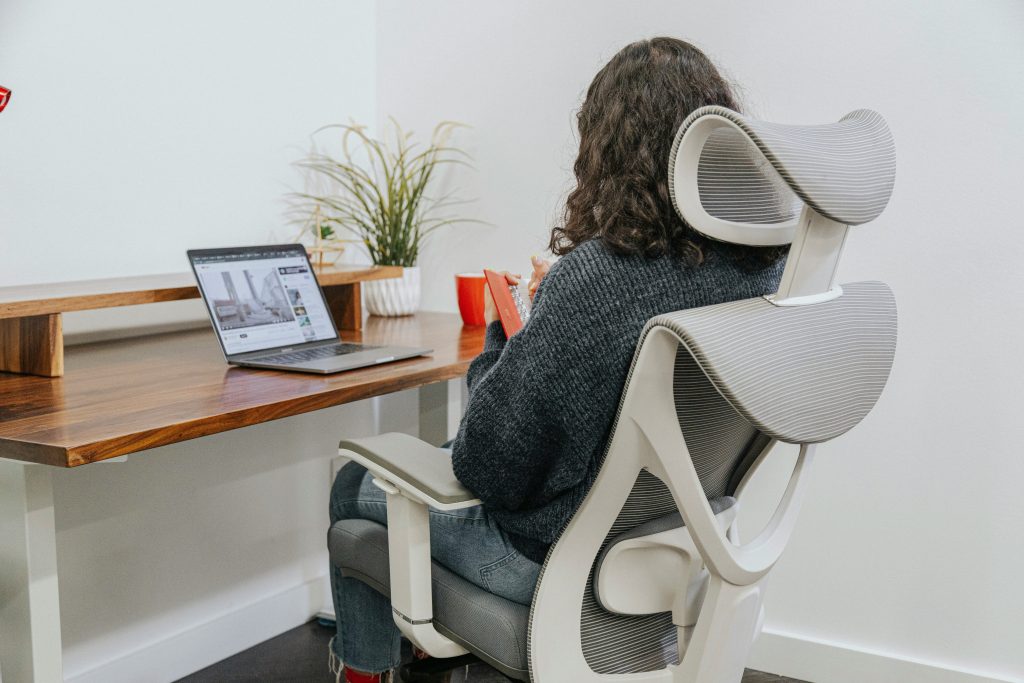
Even the best chair won’t help if it’s set up incorrectly. Start with seat height. Your feet should be flat on the floor, with your knees roughly level with or slightly below your hips. Adjust the lumbar support so it fits into the natural curve of your lower back.
Set the backrest angle to a slight recline that feels comfortable while keeping you supported. Position the armrests so your shoulders stay relaxed, and your elbows rest naturally. Finally, align your monitor so you’re not looking down or straining your neck.
Common Mistakes to Avoid
Sitting Too Long Without Moving
The biggest mistake isn’t poor posture. It’s staying in any posture for too long. Even if your chair is perfectly adjusted, your body isn’t designed to stay static. Muscles begin to fatigue, blood flow slows, and pressure builds in areas like your lower back and hips. This is why people often feel stiff or sore even when their setup is technically “correct.”
The solution isn’t to find a perfect position. It’s to rotate between positions. Lean back, sit more upright, shift your weight, or stand if you have that option. The goal is to avoid long, uninterrupted blocks of stillness. If you feel discomfort building, it’s usually not because your chair is bad. It’s because you’ve been in one position for too long.
Ignoring Chair Adjustments
Most ergonomic chairs are highly adjustable, but many people never actually use those adjustments. They sit down, leave everything at default settings, and assume the chair will “work” out of the box. It doesn’t.
If your lumbar support is too low, it won’t support your spine. If your seat height is off, your entire posture shifts. If your armrests don’t align with your desk, your shoulders compensate. An ergonomic chair only becomes ergonomic when it’s adjusted to your body.
Spending a few minutes dialing in seat height, lumbar position, armrests, and recline angle can completely change how the chair feels. Without that, even a premium chair can feel uncomfortable.
Relying on the Chair Alone
A common misconception is that buying a good chair will automatically solve discomfort. In reality, your chair is just one part of a larger system. If your monitor is too low, you’ll still lean forward. If your desk is too high, your shoulders will still tense. If your keyboard position is off, your wrists and arms will still compensate. This is why some people upgrade their chairs and feel no difference.
The chair sets your foundation, but your desk height, screen position, and input devices need to align with it. When everything works together, that’s when the setup actually starts to feel comfortable.
Choosing Style Over Function
A chair can look premium and still perform poorly. Many chairs focus on thick cushioning, leather finishes, or aesthetic design, but lack the adjustability needed for real ergonomic support. They may feel comfortable at first, but become problematic over longer sessions because they don’t adapt to your body.
True ergonomics comes from adjustability and support, not softness or appearance. A well-designed chair should allow you to fine-tune how it fits your body. If it doesn’t, you’ll eventually adapt to the chair instead of the chair supporting you, and that’s where discomfort starts.
Treating the Chair as a Static Tool Instead of a Dynamic One
Even with a fully adjustable chair, many users treat it as something they “set once” and never touch again. But your needs change throughout the day. You may want to sit more upright during focused work, recline slightly during calls, or shift your position as your body starts to feel fatigued.
Ergonomic chairs are designed for movement, not rigidity. The more you use those features, tilt, recline, subtle position changes, the more comfortable your workday becomes. Ignoring this turns even a good chair into a static, less effective tool.
Ergonomic Chairs vs Regular Office Chairs
At a glance, many office chairs look similar. The difference only becomes obvious after a few hours of sitting.
A regular office chair is typically built around a fixed structure with minimal adjustments. You might get basic height control and a simple recline, but the chair largely assumes your body will adapt to it. If your proportions don’t match that design, you compensate by slouching, leaning forward, or holding tension in your shoulders.
An ergonomic chair flips that relationship. Instead of forcing your body to fit the chair, it allows the chair to adapt to your body. This shows up in areas that directly affect comfort over time: lumbar positioning that actually aligns with your spine, seat depth that matches your leg length, and armrests that line up with your desk rather than pulling your shoulders out of position.
The real difference isn’t how the chair feels in the first five minutes. It’s how your body feels after four or five hours. With a regular chair, discomfort tends to build gradually as your body compensates for poor support. With an ergonomic chair, that buildup is reduced because the chair removes many of those small, constant stress points. It’s less about “comfort” in the traditional sense and more about reducing the effort your body has to put in just to sit.
Who Should Use an Ergonomic Chair?
Technically, anyone who sits can benefit, but the level of impact depends on how you work. If you spend multiple hours a day at a desk, your chair becomes a primary load-bearing tool for your body. Over time, even small inefficiencies in support or positioning compound into noticeable discomfort.
People who benefit the most tend to fall into a few patterns. Those working long, uninterrupted sessions, such as office workers or remote professionals, experience the biggest difference because they’re exposed to sustained sitting loads. The longer you sit, the more important proper support becomes.
Students and content creators often sit in less structured environments, where poor setups are more common. An ergonomic chair can act as a corrective baseline, reducing the impact of inconsistent desk or monitor positioning.
Gamers and high-focus users benefit in a different way. They tend to stay in one position for extended periods without noticing discomfort building. In these cases, a chair that supports movement and reduces strain helps prevent fatigue from creeping in unnoticed.
Even for people who don’t sit all day, an ergonomic chair still matters if sitting sessions are intense or repetitive. It’s not just about duration. It’s about how much strain accumulates during the time you are seated.
Are Ergonomic Chairs Worth It?
An ergonomic chair is worth it, but only when it’s used correctly and in the right context. The biggest value comes from reducing cumulative strain, not delivering instant comfort. You may not notice a dramatic difference in the first hour, but over days and weeks, the reduction in tension, fatigue, and stiffness becomes more apparent.
Where ergonomic chairs make the most impact is in consistency. They create a stable, repeatable sitting environment where your body doesn’t have to constantly adjust or compensate. That consistency is what prevents discomfort from building over time.
However, they are not a standalone solution. If your desk height is off, your monitor is too low, or you sit for long, uninterrupted periods without moving, even the best chair won’t fully solve the problem. This is why some people invest in a high-end chair and feel underwhelmed. It’s not being used as part of a complete setup.
When combined with proper desk alignment and regular movement, though, an ergonomic chair becomes one of the most effective upgrades you can make. It doesn’t eliminate sitting. It makes sitting sustainable. And for anyone who spends a significant portion of their day at a desk, that difference adds up quickly.
Final Thoughts
An ergonomic chair is not about sitting perfectly. It’s about sitting better. It supports your body, encourages movement, and helps reduce the strain that comes from long hours at a desk. When combined with a proper workstation setup and regular posture changes, it becomes a key part of a pain-free working environment.
If you’re building or upgrading your workspace, this is one of the most important places to start. From here, explore our guide to the best ergonomic chairs, in-depth reviews, and setup tips to find the right fit for your needs.
Frequently Asked Questions
What makes a chair ergonomic?
An ergonomic chair offers adjustability, lumbar support, and proper alignment to support your body during sitting.
Are ergonomic chairs good for back pain?
They can help reduce strain and improve posture, especially when combined with a proper workstation setup.
How long should you sit in an ergonomic chair?
There’s no fixed limit, but it’s important to take breaks and change positions regularly.
Do I still need a standing desk if I have an ergonomic chair?
Yes. Sitting and standing serve different purposes. A combination of both provides the best balance.
What is the best ergonomic chair for long hours?
The best chair depends on your body, preferences, and work style. Adjustable features and proper support are key factors.