Perfect Standing Desk Height: How to Find the Right Ergonomic Position for Your Workspace
Table of Contents
Standing desks have transformed the way people work, but buying an adjustable desk is only half the equation. Even the best standing desk can contribute to neck pain, shoulder tension, wrist discomfort, or lower back fatigue if it’s adjusted incorrectly.
The perfect standing desk height isn’t a single measurement that works for everyone. It depends on your height, proportions, footwear, keyboard placement, monitor position, and even the type of work you perform throughout the day.
Rather than searching for one magic number, it’s better to understand the ergonomic principles behind a properly adjusted workstation. Once you know what your body should feel like, finding your ideal desk height becomes much easier, and you’ll know how to adjust it whenever your setup changes.
Why Standing Desk Height Matters
Many people assume that standing automatically improves posture. In reality, standing with poor ergonomics can create just as many problems as sitting incorrectly.
When your desk is too high, your shoulders naturally rise toward your ears. This constant elevation places unnecessary tension on the neck and upper back. Over time, it can contribute to headaches, muscle fatigue, and shoulder discomfort.
If your desk is too low, you’ll likely round your shoulders and lean forward while typing. This places extra stress on the spine and often leads to wrist extension, increasing the risk of repetitive strain injuries.
Proper standing desk height allows your body to remain in a neutral position, where muscles perform only the work necessary to support movement rather than compensating for poor workstation design.
Good ergonomics can reduce neck, shoulder, and back pain while making typing more comfortable by keeping your wrists in a neutral position. It also encourages healthier posture, helps reduce muscle fatigue during long work sessions, and improves focus by minimizing the physical discomfort that can become distracting over the course of the day.
There Is No Universal Standing Desk Height
You’ll often find online charts listing ideal desk heights based on overall body height. While these charts provide a helpful starting point, they shouldn’t be treated as exact measurements.
Two people who are both 5’10” may have completely different torso lengths, arm lengths, shoulder widths, and leg proportions. One may require a desk that’s over an inch higher than the other to achieve proper ergonomics.
Instead of focusing exclusively on numbers, adjust your desk according to your body’s position. The goal is to create natural alignment rather than matching a published height chart.
The Best Standing Desk Position
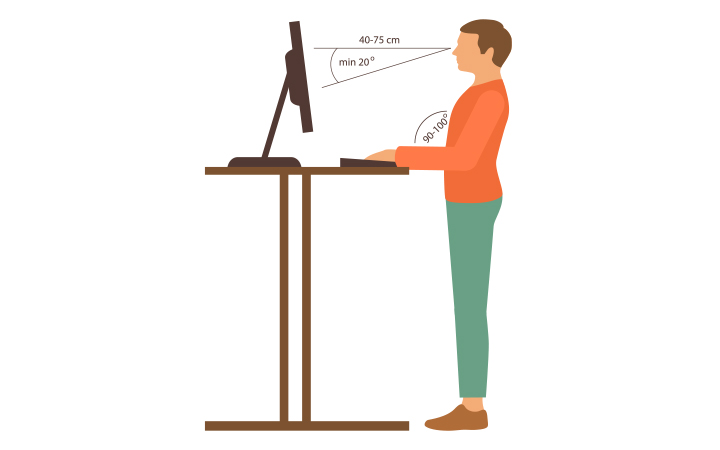
A properly adjusted standing workstation should allow your body to maintain relaxed, natural posture.
Elbows Should Form About a 90-Degree Angle
The keyboard surface should sit roughly at elbow height.
When typing, your elbows should remain close to your sides with your forearms approximately parallel to the floor. Your wrists should stay straight rather than bending upward or downward, while your shoulders should remain relaxed instead of lifted. Maintaining this neutral position helps reduce strain on your muscles and joints, making it easier to work comfortably for longer periods.
If you notice yourself shrugging while typing, lower the desk slightly. If you’re leaning forward to reach the keyboard, raise it.
Keep Your Wrists Neutral
One of the most common ergonomic mistakes is allowing wrists to bend upward while typing.
A neutral wrist position minimizes pressure on tendons and nerves, making long typing sessions significantly more comfortable. Avoid resting your wrists heavily on the desk while actively typing. Wrist rests are best used during pauses rather than as continuous supports.
Monitor Height Is Just as Important
Desk height alone doesn’t determine good posture. Your monitor should be adjusted independently whenever possible.
Ideally, the top of your monitor should sit at or just below eye level, with the center of the display falling slightly below your natural line of sight. Position the screen about an arm’s length away so you can read comfortably without leaning forward, and tilt it slightly upward if needed to reduce glare. These adjustments help keep your neck in a neutral position and reduce eye strain during long work sessions.
If your monitor is too low, you’ll constantly flex your neck. If it’s too high, you’ll tilt your head backward, increasing neck strain. A monitor arm often makes fine adjustments much easier than relying on a fixed monitor stand.
How Keyboard and Mouse Placement Affect Desk Height
Your keyboard and mouse should remain on the same level whenever possible.
If your mouse sits higher than the keyboard, your shoulder remains elevated during mouse use. Over several hours, this imbalance can contribute to shoulder fatigue. Likewise, reaching too far for your mouse forces repeated shoulder extension throughout the day.
Keep both devices close enough that your elbows stay beside your torso. Many ergonomic specialists recommend allowing your hands to move naturally without constantly reaching or stretching.
The Right Standing Posture
Finding the perfect standing desk height also means paying attention to the rest of your body.
Aim for these alignment cues:
- Head balanced directly over your shoulders
- Chin parallel to the floor
- Shoulders relaxed
- Spine maintaining its natural curves
- Hips centered over your feet
- Knees slightly unlocked
- Feet approximately shoulder-width apart
Avoid locking your knees. Locked knees reduce circulation and often increase fatigue during prolonged standing. Instead, shift your weight naturally throughout the day. Small movements are healthier than remaining perfectly still.
Should You Wear Shoes While Adjusting Desk Height?
Yes. If you normally work while wearing shoes, adjust your desk while wearing those same shoes.
Footwear changes your effective standing height. Athletic shoes with thick cushioning may raise your working height by an inch or more compared with working barefoot. If you alternate between shoes and barefoot work, save multiple height presets on your electric standing desk.
Standing Mats Can Improve Comfort
Standing on a hard floor for several hours places additional pressure on your feet, knees, and lower back. An anti-fatigue mat encourages subtle muscle movement that improves comfort during longer standing sessions.
These mats don’t eliminate fatigue entirely, but many users notice reduced discomfort compared with standing directly on hardwood, tile, or concrete floors. They’re particularly beneficial if you stand for multiple hours each day.
For more guidance on reducing discomfort, consider learning how long you should stand at a desk.
Should Your Desk Height Change Throughout the Day?
Surprisingly, yes. Your body naturally changes over the course of the day.
The discs in your spine compress slightly while standing and sitting, making you marginally shorter by evening than in the morning. Most people won’t notice this difference, but some standing desk users find that lowering the desk slightly later in the day feels more comfortable.
You may also adjust the desk depending on your activity. Tasks involving intensive typing often benefit from a slightly lower position that allows relaxed shoulders, while reading documents may feel more comfortable with the desk raised just a little.
Small adjustments can reduce repetitive loading on the same muscles throughout the day.
Standing Doesn’t Mean Standing Still
One of the biggest misconceptions about standing desks is that you should remain upright for hours without moving. But movement is far more beneficial than maintaining any single position.
Alternate between sitting, standing, walking briefly, stretching, and changing foot position. Even shifting your weight every few minutes helps improve circulation and reduces muscle fatigue.
Many ergonomic professionals recommend alternating positions every 30 to 60 minutes rather than spending an entire morning standing.
Common Standing Desk Height Mistakes
Even with an adjustable desk, many people unknowingly create poor ergonomic habits.
Setting the Desk Too High
A desk that’s even an inch too high can force your shoulders upward throughout the workday. If your neck feels tight after typing, check whether your shoulders remain elevated.
Focusing Only on the Desk
Many users carefully adjust desk height while leaving their monitor far too low. Poor monitor positioning often causes more neck discomfort than desk height itself.
Reaching for the Mouse
A mouse positioned too far away places constant strain on the shoulder. Keep frequently used devices within easy reach.
Locking Your Knees
Standing rigidly for extended periods reduces comfort. Keep a slight bend in your knees and continue making small posture changes throughout the day.
Ignoring Footwear Changes
Switching between sneakers, dress shoes, slippers, or barefoot work changes your ideal desk height. If your desk supports memory presets, save separate settings for your most common situations.
Finding Your Personal Perfect Standing Desk Height
The ideal standing desk height isn’t determined by a chart. It’s determined by how naturally your body aligns while you work.
Start by positioning your elbows at roughly 90 degrees, relaxing your shoulders, and keeping your wrists straight. Then adjust your monitor so your neck remains neutral, and your eyes naturally meet the upper portion of the screen. Finally, pay attention to how your body feels over several hours rather than just the first few minutes.
A properly adjusted standing desk should almost disappear into the background. Instead of thinking about your posture or shifting constantly to get comfortable, you should be able to focus on your work. Taking the time to fine-tune your workstation, revisit your settings as your routine changes, and alternate between sitting and standing throughout the day will help you get the most from your desk while reducing unnecessary strain over the long term.